Periferal Join waitlist

Product specs, played as a team sport.

Shape what gets built, in real-time, together with your entire team and all their agents.Get a beautiful editor experience for humans, structured data for agents,
+ context synced live from everywhere.

Insert coin: join the revolution!

See Periferal in action

Try Periferal's features right here in the live demo.Take over the window by clicking or tapping into it.

01Your biggest productivity challenge

AI made every developer 10× faster. Teams didn't follow.

Each person's AI boost should compound at team level, into unmistakable collective outcomes. The numbers tell a different story.

With AI
individual output
10×
turns into
accepted team output
2–3×
turns into
real outcomes
even less
The rest?
unnecessary rework
The rest?
wasted effort
02The human collaboration is being displaced

Everyone's talking to their agents. Not to each other.

Solo player

Code production is focused work and suitable for the human-to-agents coordination.

Multi player

Working out what's worth building is a collective exercise and needs deep human collaboration.

03The plot

Periferal specs don't need babysitting.
Share them with confidence

0:38 · with sound
Level select
Read what happens

1 · Solo player

10:00 AM. An engineer asks Claude Code to structure the spec from everything discussed. It reads 14 Slack threads, 6 docs and 3 meeting notes, and writes a 2,184-line spec file. The engineer pushes it and leans back.

2 · Buried

30 minutes later, the notifications pile up: pull request comments, a meeting booked to discuss the layout, Radhi's shared research doc, Josh's alternative design, three new Linear issues, a Slack thread asking CRDTs or OT. They bury the spec. Danger! The engineer hides under the desk.

3 · Connected

Periferal opens on the monitor. The spec is structured into blocks, requirements and decisions, and every notification is connected to the block it's about, one at a time: the Slack thread to the CRDTs decision, the PR comments to the Yjs provider, the meeting and the alternative design to the presence layout, the issues to presence cursors. Combo!

4 · Synced

The team's agents sync to the plan and implement R-02, approved.

5 · Relax

The engineer leans back again, and the Periferal logo grows off the screen into the end card.

Periferal. Product specs reimagined: collaborative, connected, always up-to-date.

04Join the human collaboration revolution!

The solution?
Human-first
product specs.

Periferal puts “human” in the human-to-human-to-agents collaboration on product specs; it's the place where collective decisions, product judgement and taste live.People shape what's worth building; agents help and execute.Everyone gets perfect peripheral vision during the entire exercise.

Press start
Our manifesto esc
You're on the list esc

Thanks for joining the waitlist.

We're opening the alpha to a few product teams at a time. We'll write to you as soon as there's a seat for yours.

Until then, the live demo on this page is yours to play with.

Product shaped in a collaborative space

Three perspectives,
one shared medium.

Power-up 1 · Humans-first

A live collaborative surface

A beautiful editor and reading experience for people: the spec reads like a document, while the whole team edits, comments and decides on it live.

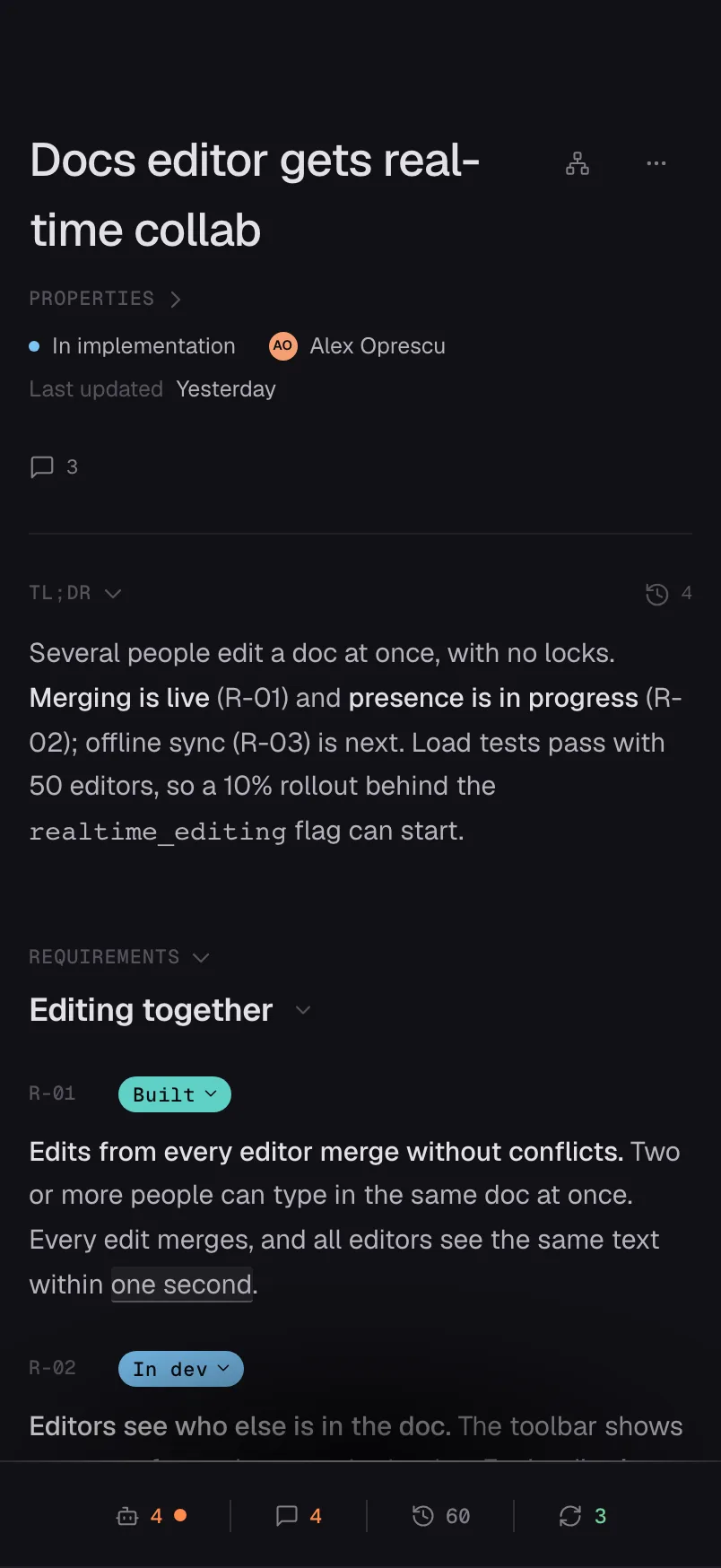
R-02 Editors see who else is in the doc. The toolbar shows live avatars for up to five people in the doc, with their cursors.
Power-up 2 · Agents invited

Structured for agents

An opinionated structure, enforced over CLI: requirements, decisions and implementation details as blocks, each holding the context agents need, each versioned on its own.

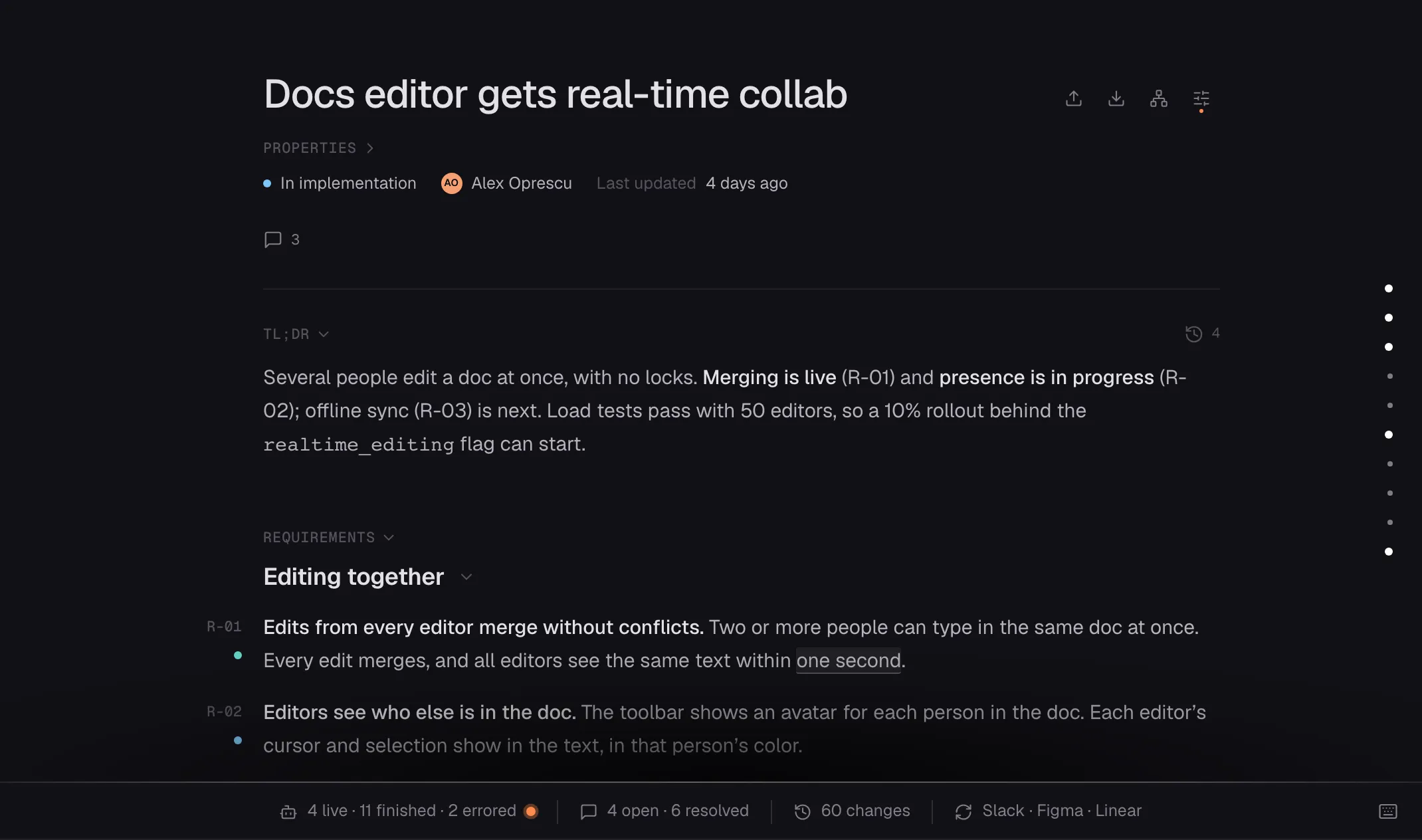
R-01Edits from every editor merge without conflicts. Everyone sees the same text.
Acceptance criteriaTwo people typing in one paragraph never lose a letter.Alex · Sep 3
Power-up 3 · Connected data

A synced central ledger

Real-time sync with local and cloud coding agents, Slack, Linear, Granola and more. Every thread, comment and agent run lands on the block it's about.

05A plugin for every agent

Structure guaranteed. Your AI of choice.

Install the plugin and use Periferal with Claude Code, Codex or any other local coding agents.

Agents get exactly the context they need
In sync across every agent session
Context from agent session written back into the spec
High score1.2k tokensnot 48kin our tests
mia · codex
… working on R-05
↻ Periferal · R-04 changed by Alex's Claude Code
Fetching just R-04 to get the context.- 1457 tokens
06How it all works

A product spec
taken from idea to shipped.

  • Structured
  • Shaped together
  • Enriched with context
  • Aligned in the open
  • Built in parallel
  • Shipped without surprises
Level 1Structure

Bring your Markdown. Get structured blocks.

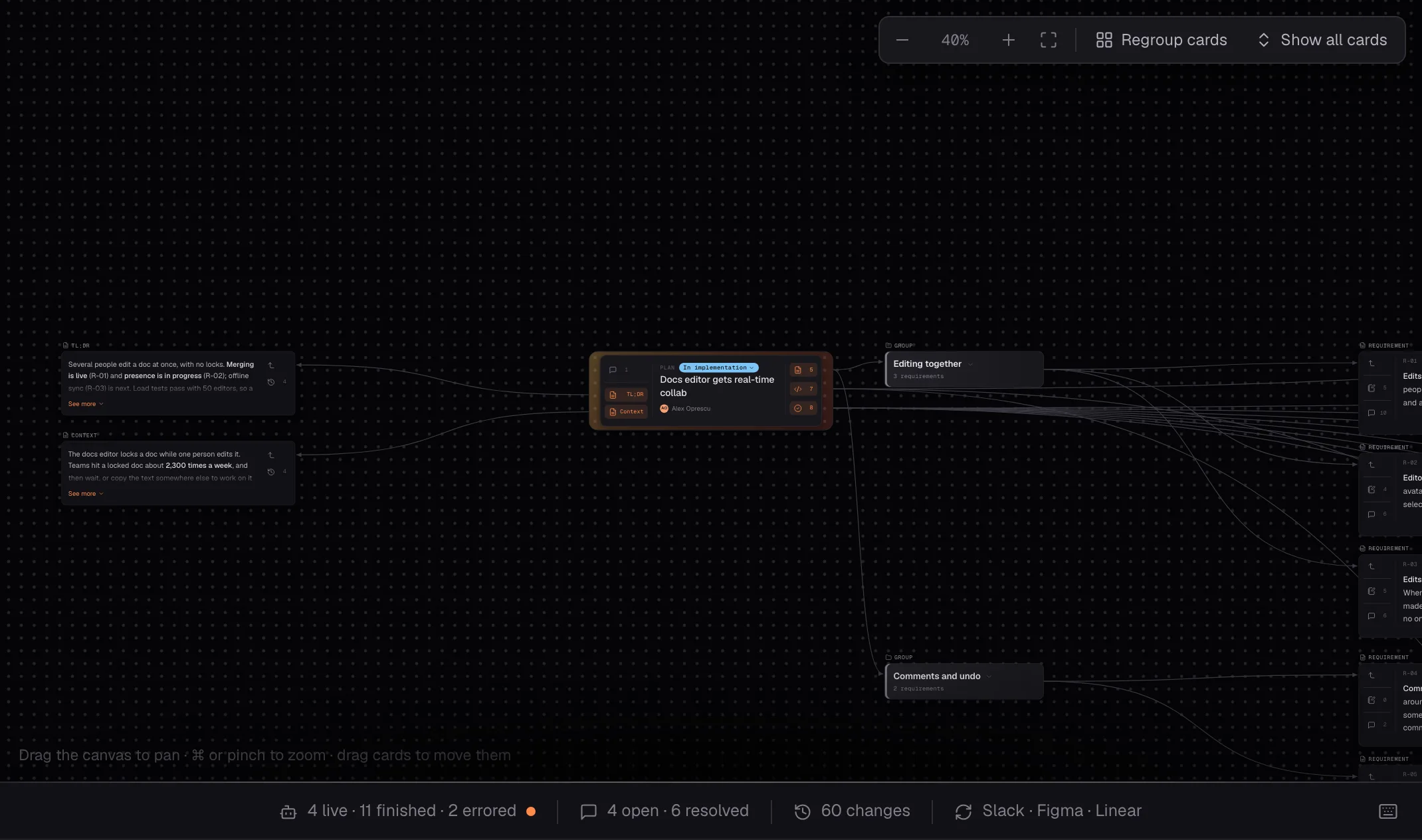
Any markdown spec gets structured into a list of smart interconnected blocks.

  • Reads like a document.
  • Every block is structured data.
  • Every block holds its full context.
Level 2Shape

Generate the plan with your agent. Shape it together with your team.

A few prompts in your local agent, and the plan lands in Periferal through its CLI, immediately synced to the whole team and all their agents.

  • Collaborative from the get-go.
  • Everyone sees what everyone is working on.
  • Agents included.
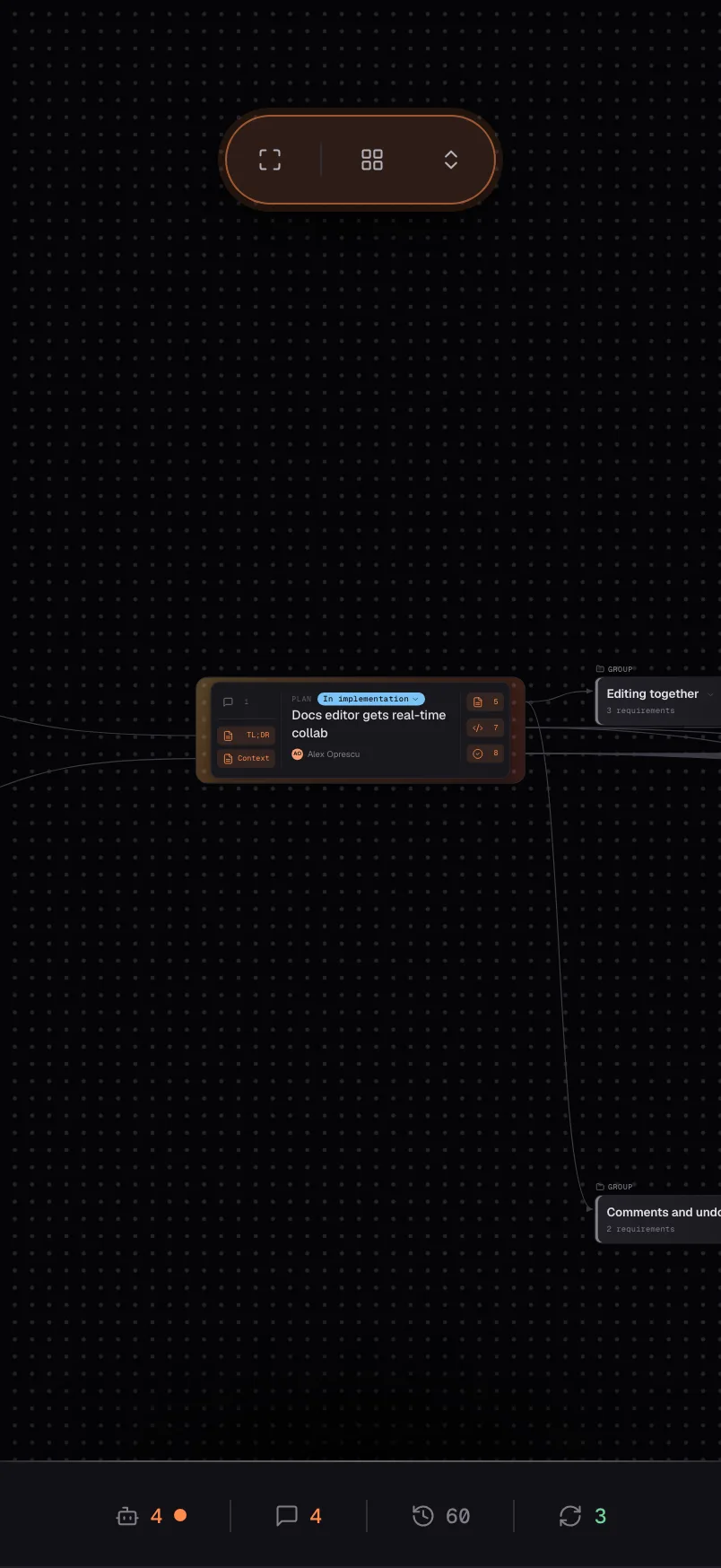
acme / editor / real-time-collaboration
A requirement in the Periferal app, with its context, iterations and outputs, and four teammates editing it together
Level 3Context

Bring in the context, link it on the block.

Upload files, link resources, and automatically bring context from all your tools.
Everything gets structured and linked into the plan.

  • Files, videos, images and links as artefacts.
  • Notes typed as evidence, insights, acceptance criteria.
  • Conversations, threads, comments from other tools.
alex · claude code · ~/acme/editor
› Add context into the plan from Slack, Linear, Figma, Notion, Loom, Granola, GitHub, ...
MCPs · slack, linear, figma, granola(search: "collab")
  ✓ 3 threads · 1 issue · 1 design · 1 meetingPeriferal · add_note(R-03, type: "Insights")
  ✓ R-03 · "Offline edits are the #1 fear: 7 of 9 users"
  ✓ R-03 · "Lost work after a reconnect: 4 of 9 users"
  ✓ R-03 · "Edits must survive a closed laptop"

Periferal · link(R-02, linear: "presence")
  ✓ R-02 · Linear EDT-142 · Presence avatars
  ✓ R-02 · Linear EDT-147 · Idle state in the toolbar

Periferal · link(R-02, figma: "Cursors v3")
  ✓ R-02 · Figma · Cursors v3

Periferal · link(R-01, slack: "merge")
  ✓ R-01 · Slack · #project-real-time
  ✓ R-01 · Slack · #eng-sync · "CRDT or OT?"
  ✓ R-01 · Slack · Josh → Radhi · spike results

Periferal · link(R-04, granola: "Product sync")
  ✓ R-04 · Granola · meeting notes
Level 4Align

Align in the open, wherever the conversation happens.

Decisions made in inline comments, Slack conversations or comments on a pull request?
All find a home in Periferal.

  • Slack, Linear or GitHub conversations.
  • Granola or Notion meeting transcripts.
  • Decisions extracted and linked.
R-01 · Conversations
A Slack thread synced into a requirement's conversations, with the decision it updated
Level 5Build

Agents build in parallel, each with just the right context.

Product engineers and their agents work off the plan at the same time. Each one fetches only the slice it needs, every run is captured, every change is versioned, and every session gets the updates from the others.

  • Agent runs synced in real time on the related block.
  • Context and outcomes highlighted.
  • Per-block history of every change.
R-01 · Agent runs
The agent runs of a requirement: Claude Code built the sync service, Codex load-tested it
Level 6Ship

Ship in days, without late disagreements.

With the whole team and their agents shaping the plan together in real time, the feature is built and shipped without double work or wasted effort. Every requirement shows where it stands.

  • Statuses from draft to built, live for everyone.
  • No hidden changes.
  • Always up to date.
Requirements · live
The plan's requirements, their statuses moving up one by one to Built
For individuals and teams

Start with local .md files. Move to cloud to collaborate.

Solo developer?
Start with local .md files.

LocalWork with your local folders and .md files. Use git, worktrees and your local agents to shape them.

Working in a team?
Move to cloud to collaborate.

CloudOrganize shared specs into projects that all your team has access to. Context from Slack, Figma, Linear and others flows in automatically.
For every role

One plan.
For everyone on the team.

Product engineer

Build together with your peers from an always up-to-date spec your agent can actually read.

  • 01Your agent pulls just the requirement it's building, with its decisions and constraints.
  • 02All assets are collocated, status and pull requests are auto-synced. No ticket to manually update.
  • 03When a requirement changes, every agent session knows within seconds.
Product manager

Shape the plan together with the team, not for them.

  • 01Start writing in Markdown or generate with your agent. The spec is automatically formatted as structured inter-connected blocks.
  • 02The spec is auto-updated for you. Slack threads, Linear issues and Figma files sync on the block they're about.
  • 03Watch your spec getting the engagement it deserves; every requirement moves from Draft to Shipped, live.
Designer

Your designs, right in the context of the requirement they shape.

  • 01Give a visual for each requirement by linking a Figma frame to the exact block.
  • 02Keep working in Figma, all the conversations held and decisions made on the design sync back into the product spec as context.
  • 03Know the moment a requirement your design depends on changes.
Engineering manager

See what's being built, by whom, how, and why.

  • 01Every block shows who's on it, person or agent, and where it stands.
  • 02Context from agent sessions and the produced outputs are logged on the right block.
  • 03Align on requirements with your product and design peers, and all your team's stakeholders, before any code gets produced.
Product leader

Every product feature, from idea to shipped, in one place.

  • 01Follow every team's plans at a glance, go into details when it matters.
  • 02Decisions are extracted and linked, so the why is never lost.
  • 03Spot what's stuck in review before it turns into late.
CTO

AI output your team can trust.

  • 01Agents build from the agreed spec, not from a guess.
  • 02Every change has its history at block level: who, when, and which agent.
  • 03Works with the agents your team already uses, locally or in the cloud.
Founder

Move at AI speed without losing the team.

  • 01One shared plan for people and agents, from day one.
  • 02Collaborate on product specs like in the early days. Contribute to the collective product sense of your teams.
  • 03You see the same plan as everyone else, so less reporting in meetings, more effective collaboration.
Sales

Know what's shipping before the customer asks.

  • 01See where each feature stands, live, without pinging R&D.
  • 02Collaborate with the product team; link a customer's request to the requirement that answers it.
  • 03Talk about what's coming with the same context the product team builds from.
Marketing

Launch what's actually shipping.

  • 01Follow features from Approved to Shipped as it happens; with all their details and context.
  • 02Read the why behind every feature, in plain language.
  • 03Plan the launch from the same spec the product team builds from.
Support

Answer with how it really works.

  • 01Find the requirement behind any behaviour, with the decisions that shaped it.
  • 02Collaborate with product; bring customer reports onto the block they're about.
  • 03See what changed, when and why, block by block; so you can offer a stellar support to your customers.
Finance

See the ROI of the team collaboration. And AI used effectively.

  • 01Optimized costs; agents fetch just the slice they need, not the whole spec, so fewer tokens get spent.
  • 02Follow what's planned, in progress and shipped across teams.
  • 03Higher efficiency; less rework from specs that were misread.
FAQ

Questions, documented.

What is Periferal?

Periferal is a shared, structured workspace for product specs. A product team and all their AI agents shape the plan together in real time, from the first idea to the shipped feature.

How is it different from a PRD in Notion, Google Docs or Linear?

A document stores the spec as free text. Periferal stores it as structured blocks (requirements, decisions and implementation details), each with its notes, conversations, linked artefacts and history. People read it like a document; agents read and update it block by block.

Which AI agents does Periferal work with?

Periferal has plugins for Claude Code, Codex, Cursor, OpenCode, Hermes, Pi.dev and more. Any local agent can use the Periferal CLI.

Do I have to stop writing specs with my agent?

No. Most specs start the same way: a few prompts in your local agent. The plan then lands in Periferal through its CLI, structured into blocks and synced to the whole team and their agents.

Which tools sync into a plan?

Slack threads, Linear and Jira issues, GitHub pull requests, Figma designs, Miro boards, Loom videos, Granola notes, Notion and Confluence pages, and more. Each lands on the block it's about, and decisions made in conversations are extracted and linked.

How do agents get just the right context?

Each agent fetches only the slice it needs: one requirement, its decisions and its constraints, not the whole spec file. In our tests that was about 1.2k tokens instead of 48k. When a requirement changes in one session, the other agents know within seconds.

Is Periferal available today?

Periferal is in alpha. We're opening it to a few product teams at a time. Join the waitlist, and we'll reach out when we're ready to onboard your team.

07

Start playing specs as a team sport.

We're opening the alpha to a few product teams.
Join the waitlist, and we'll reach out when ready to onboard you.

We'll only email you about the alpha. No spam. Privacy policy